ideaZ

MIDI sequences &
chord progressions.

Generate MIDI for your own synths. Choose a key and style, adjust the rhythm and note range, then compare variations or export the notes to your DAW.

Explore ideaZ
MACOS / VST3 + AU / YOUR OWN SOUNDS
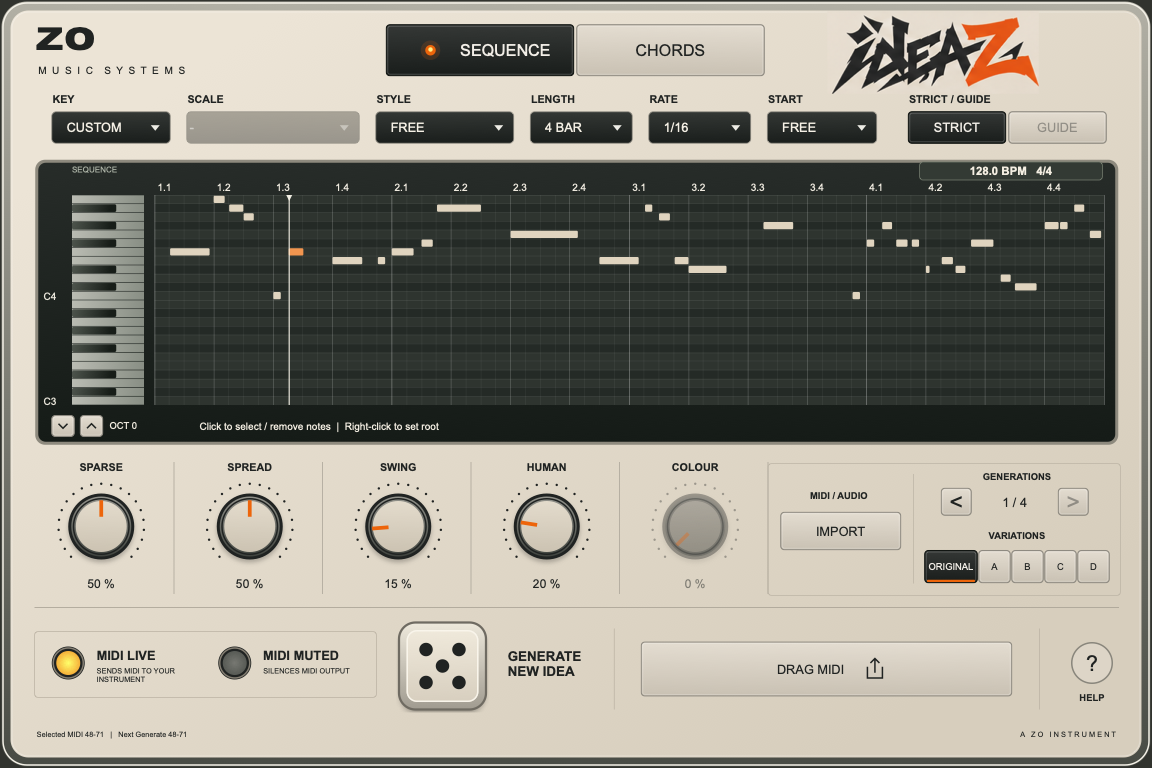
ideaZ plugin with its piano roll, generation controls and variations
HOUSE + UK GARAGE + DISCO + JUNGLE + DRUM & BASS + ACID

How ideaZ works.

ideaZ creates MIDI. Your favourite synths and instruments bring it to life.

Sequence mode in ideaZ

Generate melodies
and basslines.

Choose your notes, set a style, and generate a starting point. Adjust Sparse, Spread, Swing and Human to take it somewhere new.

Original and A–D give you related directions to explore, while the original stays within reach.

01

Set the direction.

Choose a key, scale and style. Keep the suggested settings or tweak every one.

02

Find your idea.

Generate, compare Original with A–D, and revisit earlier ideas.

03

Make it your own.

Audition through your instrument. Drag the MIDI into your DAW and keep creating.

Choose what changes.

Most controls prepare the next idea. Set them, then press Generate; they do not rewrite the pattern you are currently hearing.

Key, Scale & selected notes
Choose a key and scale, or select your own notes with CUSTOM. Left-click a keyboard note to include or remove it; right-click to set the root. Strict uses only selected notes. Guide can also use other notes from the named scale.
Style
House, UK Garage, Disco, Jungle, Drum & Bass and Acid load suggested settings. You can change those settings while keeping the selected style. Free removes the genre preference. Styles shape MIDI, not the sound of your synth.
Length, Rate & Start
Length sets the number of bars. Rate sets the grid for note starts, not a fixed note duration. Start favours an early or late entrance, or leaves it Free; it does not force every pattern to begin on beat one.
Sparse & Spread
Higher Sparse values leave more space. In Chords, 75–100% also favours held progressions, with stabs and mixed phrases still possible. Sequence Spread caps the pitch range: 50% is up to one octave, 100% up to two. Chords apply Spread to each voicing.
Swing, Human & Colour
Swing delays alternate straight subdivisions; it is inactive for quarter-note and triplet rates. Human adds controlled timing, velocity and length differences. Colour allows richer harmonies in Chords mode.
Original, variations & octave
Each Generate creates an Original and A–D alternatives. Generation arrows recall recent ideas. The octave arrows shift playback and export globally, so switching ideas keeps your chosen octave.

Use an existing part as a reference.

Import MIDI or an isolated vocal, bassline or synth recording. Response favours gaps and related harmony, Reference Rhythm follows note starts, and Reference Harmony follows the source’s pitches. Your other controls still apply to the next generation.

ideaZ estimates a key and shows its confidence. You can override the matched key and scale. Audio analysis works best with a single pitched part; it does not separate instruments from a full mix.

Set up ideaZ in your DAW

ideaZ for Mac.

A MIDI generator for FL Studio and Logic Pro, with VST3 and Audio Unit formats. Connect it to your instruments to audition ideas before exporting.

ideaZMAC EDITION

Launch price · one-time purchase

£12.99GBP

  • Sequences & chord progressions
  • Six styles, plus Free
  • MIDI & audio reference guidance
  • Original + four variations
  • VST3 & Audio Unit formats
  • PDF DAW setup guide
  • Apple Silicon & Intel · macOS 11+
  • Licence for two computers
Buy ideaZ — £12.99

£12.99 before applicable tax. Secure checkout through Stripe Managed Payments (Onelink); your final total is shown before you pay.

Check your DAW setup before buying

Questions
& answers.